A Cost-Capped AI Assistant on Next.js, with No Vendor in the Middle
How I added an AI chat assistant to a Next.js website on Vercel with no chatbot vendor, no database and no vector store. Vercel AI Gateway with our own Anthropic key, prompt caching instead of RAG, and a hard monthly budget cap that stops requests before the model is called. About USD 0.10 per conversation.

Charith 'Alex' Gunasekara
Head of Development & Engineering
Most companies that want a chat assistant on their website buy a hosted widget. A monthly fee. The vendor's script on every page. Your visitors' conversations stored on the vendor's servers, usually in the US. Your site content copied into their vector store.
This week I shipped the other option, on an Australian professional services firm's website. No chatbot vendor. No database. No vector store. The site talks to the model through Vercel AI Gateway, using our own Anthropic key.
The part most engineers do not know exists: the Gateway has a hard monthly budget. When the month's money is spent it returns 402 and the model is never called. Nothing in my own code can spend past it.
Real numbers from the function logs:
- About USD 0.015 per turn.
- About USD 0.10 per six-turn conversation.
- Under USD 25 a month at 200 conversations. The cap is set to USD 25.
How a Next.js site actually runs on Vercel
Two different things happen on Vercel. The split is why this design is cheap.
Every marketing page is prerendered to HTML at build time and pushed to Vercel's CDN. A visitor gets the page from the nearest edge cache. No server runs and no compute is billed. This is what people mean by "on the edge". It is edge caching, not edge execution.
Anything that must run code per request is a Vercel Function. Here that is one file, app/api/chat/route.ts. It runs on Fluid Compute in the Node.js runtime, in Sydney. Fluid Compute reuses warm instances across requests, so a streaming chat call does not pay a cold start on every message.
The chat widget lives on the static pages but only ever talks to the function. The pages themselves are untouched.
The request path
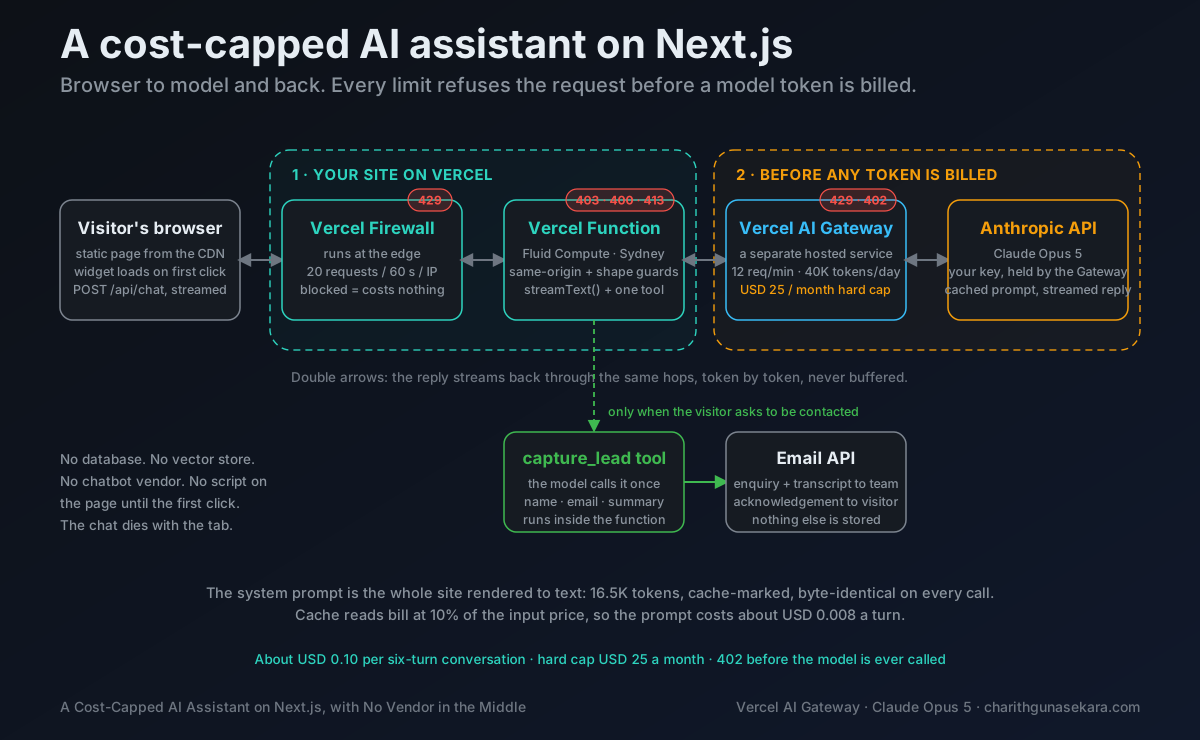
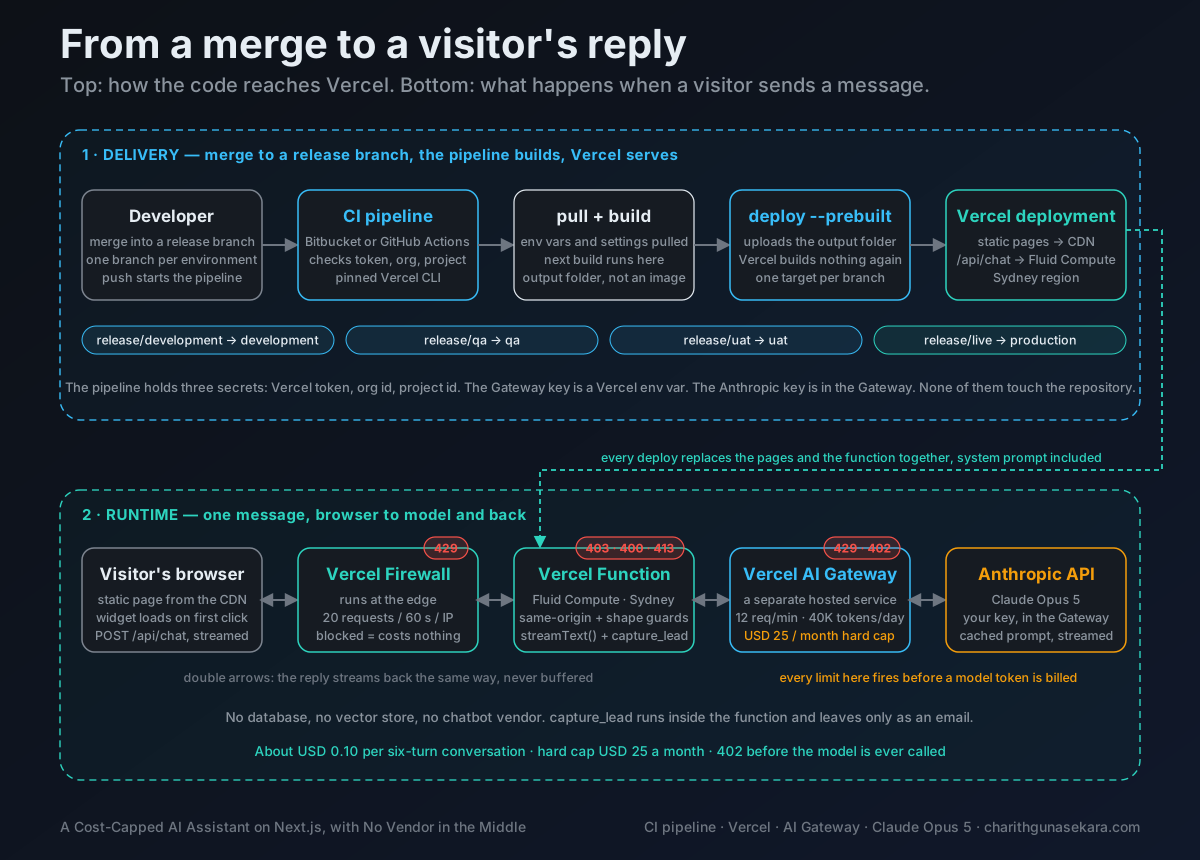
One thing to be clear about. The Gateway is not middleware in the app, and it is not a proxy in front of the site. It is a separate hosted service that the function calls over HTTPS, the same way it would call any other API. The request from browser to function never touches it.
Why there is no RAG
The site has 13 public pages. All the copy already lives in one typed TypeScript module, because the pages render from it. The assistant reads that same module at server start and renders it to plain text. That text, plus the behaviour rules, is the system prompt.
Measured size: 47,000 characters, 16,514 tokens. The "characters divided by four" rule said 11,800. It undercounts by about 40% on this kind of prose. Measure from the usage log, not from arithmetic.
Because the whole site fits in the prompt, there is nothing to retrieve. No embeddings, no vector database, no chunking, no second system to secure. When the copy changes, the prompt changes on the next deploy.
The rule I now use: under roughly 100K tokens of source content, put it all in a cached prompt. Retrieval is for when you cannot.
Prompt caching is what makes it affordable
Anthropic caches a prefix of the request when you mark it. The system prompt is that prefix, and it is byte-identical on every call. No timestamps, no visitor data, no request IDs in it. Here is the first live conversation:
| Turn | Cache write | Cache read | Uncached input | Output |
|---|---|---|---|---|
| 1 | 16,514 | 0 | 84 | 254 |
| 2 | 0 | 16,514 | 361 | 169 |
| 3 | 0 | 16,514 | 531 | 81 |
| 4 | 0 | 16,514 | 621 | 80 |
Cache reads bill at 10% of the input price. So the 16.5K-token prompt costs about USD 0.008 a turn instead of USD 0.08. Everything else in a turn is a few hundred tokens.
The same pattern shows in the Gateway's own log. Every request is a 200. Cached turns count about 17K input tokens. The first turn of each conversation shows only 82 to 91, because this view does not count the cache write as input.
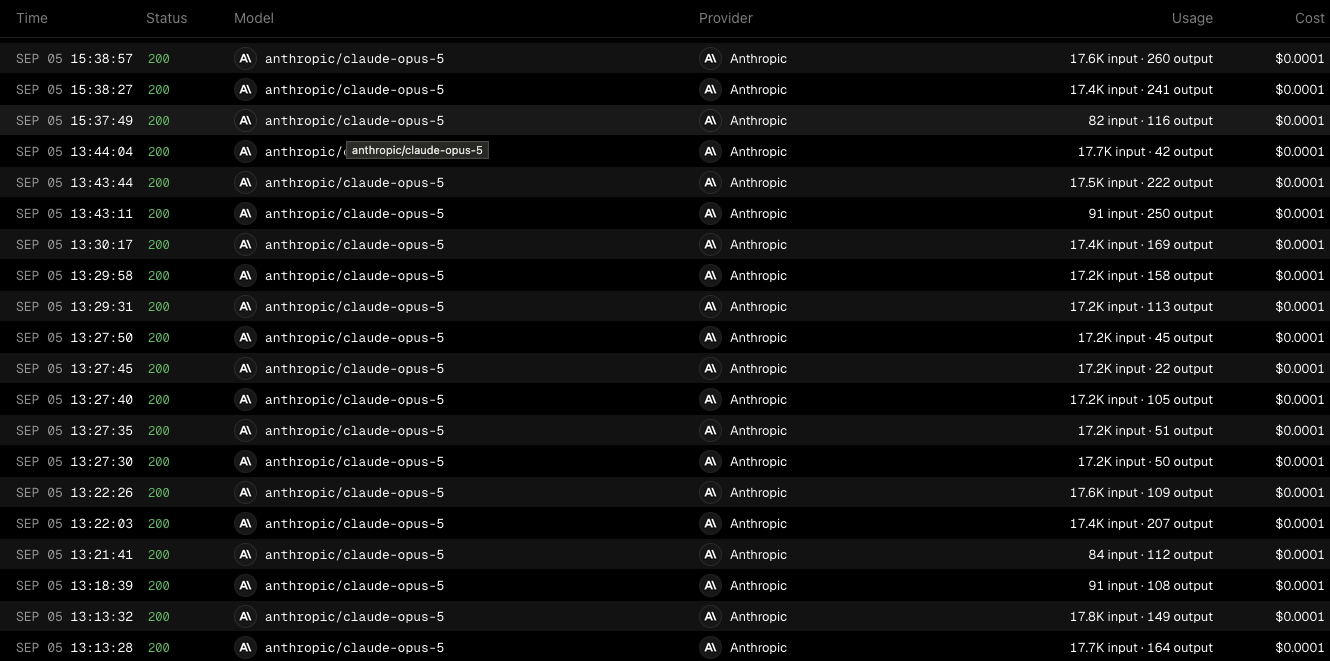
One caution when reading it. Under BYOK the cost column is what the Gateway itself charges, which is close to nothing. The Anthropic bill for the tokens is separate. This is the Anthropic console for the same key, taken the same afternoon I went live. A handful of test conversations, no real traffic yet. I wanted the number before usage made it hard to read:
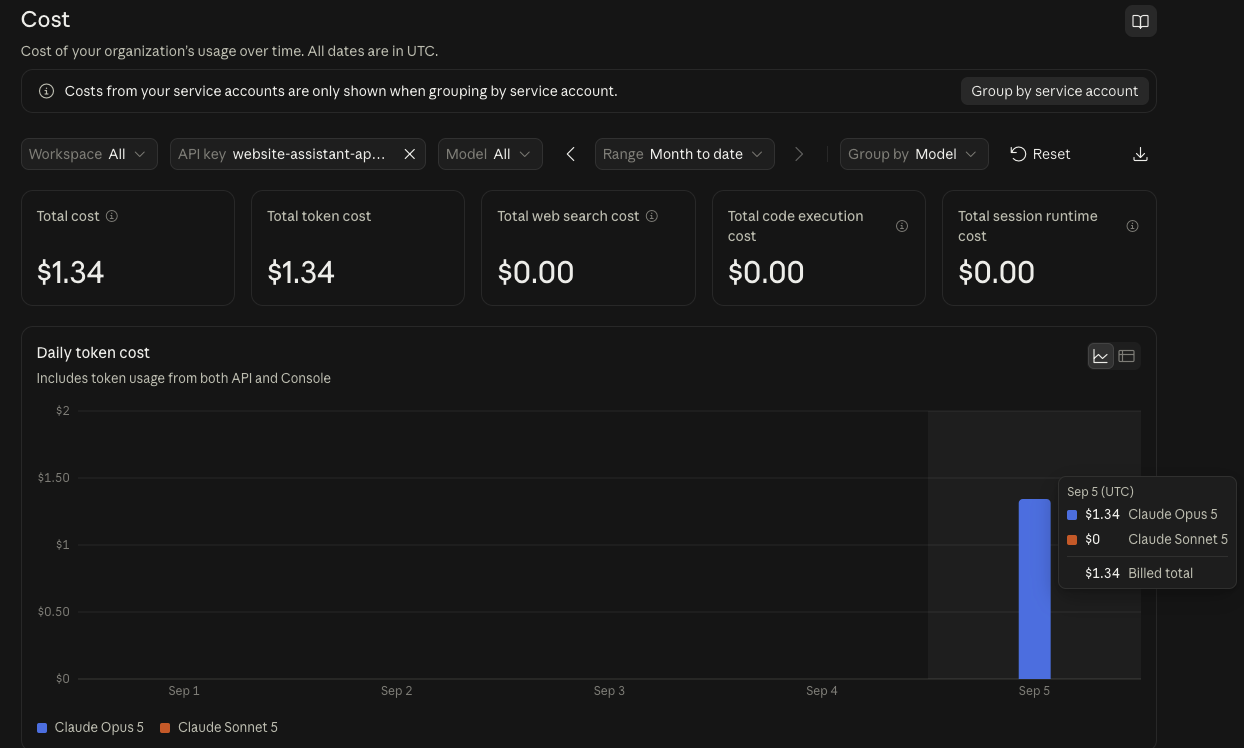
Two dashboards, one cap. The cap lives in the Gateway, and the Gateway is the only path to that key.
It is one field on the system message:
instructions: {
  role: "system",
  content: ASSISTANT_INSTRUCTIONS,
  providerOptions: { anthropic: { cacheControl: { type: "ephemeral" } } },
},
The route
This is the handler, as deployed. The three guard helpers above it are in the repo.
// A plain "provider/model" string routes through Vercel AI Gateway.
// No provider package, no Anthropic SDK, no Anthropic key in this app.
const MODEL = "anthropic/claude-opus-5";
const MAX_MESSAGES = 24;
const MAX_MESSAGE_CHARS = 1500;
const MAX_BODY_BYTES = 40_000;
const MAX_OUTPUT_TOKENS = 600;

// isSameOrigin, violates and visitorId are small helpers. Full file in the repo.
export async function POST(request: NextRequest): Promise<Response> {
  if (!isSameOrigin(request)) {
    return NextResponse.json({ error: "Forbidden." }, { status: 403 });
  }
  const raw = await request.text();
  if (raw.length > MAX_BODY_BYTES) {
    return NextResponse.json({ error: "Request is too large." }, { status: 413 });
  }
  let body: unknown;
  try {
    body = JSON.parse(raw);
  } catch {
    return NextResponse.json({ error: "Bad request." }, { status: 400 });
  }
  if (!isChatBody(body)) {
    return NextResponse.json({ error: "Bad request." }, { status: 400 });
  }
  const problem = violates(body.messages);
  if (problem) {
    return NextResponse.json({ error: problem }, { status: 400 });
  }

  const result = streamText({
    model: MODEL,
    instructions: {
      role: "system",
      content: ASSISTANT_INSTRUCTIONS,
      // The system prompt is the cached prefix. Cache reads cost 10% of the
      // input price, which is what makes a 16K-token prompt affordable.
      providerOptions: { anthropic: { cacheControl: { type: "ephemeral" } } },
    },
    messages: await convertToModelMessages(body.messages),
    tools: assistantTools,
    stopWhen: isStepCount(3), // tool call + final answer, never an open loop
    maxOutputTokens: MAX_OUTPUT_TOKENS,
    reasoning: "low", // Opus thinks by default; keep it cheap for chat
    providerOptions: {
      gateway: { user: visitorId(request), tags: ["feature:assistant"] },
    },
    // Usage lands in the Vercel function logs. That is where the cache and
    // cost numbers in the README came from. No extra observability product.
    onFinish: ({ totalUsage, finishReason }) => {
      console.log(
        `[assistant] finish=${finishReason} usage=${JSON.stringify(totalUsage)}`,
      );
    },
  });

  return createUIMessageStreamResponse({
    stream: toUIMessageStream({ stream: result.stream }),
  });
}
Three things to notice.
The model is a plain string. With AI SDK 7, a provider/model string routes through the Gateway on its own. No provider package, no Anthropic SDK, and no Anthropic key anywhere in the app.
reasoning: "low" is the SDK's portable effort control. Opus 5 thinks by default. Low effort gave 0 to 13 reasoning tokens per turn in testing, which is right for chat.
onFinish logs usage to the Vercel function logs. That is where every number in this article came from. No extra observability product.
Lead capture is a tool, not a form
The assistant has one tool. It turns a conversation into an enquiry through the same email path as the contact form.
export const captureLead = tool({
  description:
    "Send the visitor's contact details and enquiry to the team. " +
    "Call only once, and only after you have their name, email, " +
    "and a one-line summary of what they need.",
  inputSchema: z.object({
    name: z.string().trim().min(1).max(120),
    email: z.string().trim().email().max(254),
    company: z.string().trim().max(200).optional(),
    summary: z.string().trim().min(1).max(1000),
  }),
  execute: async ({ name, email, company, summary }, { messages }) => {
    const transcript = renderTranscript(messages); // last 12 turns, plain text
    const delivery = await sendContactEmails({
      kind: "enquiry",
      name,
      email,
      company,
      message: `${summary}\n\nCaptured by the website assistant\n${transcript}`,
    });
    return { ok: delivery === "sent" };
  },
});

export const assistantTools = { capture_lead: captureLead };

export type AssistantUIMessage = UIMessage<
  unknown,
  Record<string, never>,
  InferUITools<typeof assistantTools>
>;
The tool runs inside the function, in Sydney. The transcript leaves the function only as an email to the company inbox. The system prompt tells the model to collect name, email and a summary first, and to call the tool exactly once. stopWhen: isStepCount(3) bounds the loop even if the model ignores that.
Five layers, and what each one costs when it fires
| Layer | Where | What it stops | Cost when it fires |
|---|---|---|---|
| Same-origin check | Route code | Scripts, other sites, curl | Zero, before any model call |
| Shape guards | Route code | Oversized or malformed input | Zero |
| Firewall rate limit | Vercel edge | Bursts from one IP | Zero, never reaches the function |
| Gateway per-user limit | AI Gateway | Sustained abuse per visitor | Zero, before the provider |
| Gateway budget cap | AI Gateway | Everything, once the month's money is spent | Zero |
The last row is the one that lets a small company sleep.
Setting it up on Vercel
All of this is dashboard work. The code does not change.
- Project, AI Gateway tab. Enable it.
- API Keys. Create one. It is shown once, and it is the only secret the app holds.
- Integrations, BYOK. Add the Anthropic key from console.anthropic.com. From here Anthropic bills the tokens directly at list price. The Gateway adds nothing.
- Rate Limits, per user. 12 requests a minute, 40,000 tokens a day. "User" is the hashed IP the route sends in
providerOptions.gateway.user. - Budgets. USD 25 a month, "stop requests at limit" on, alert at USD 10.
- Settings, Environment Variables.
AI_GATEWAY_API_KEYfor Production and Preview. The Anthropic key is never an environment variable anywhere. - Firewall, New Rule. Path equals
/api/chat, action Rate Limit, fixed window 60 seconds, 20 requests, keyed by IP. This runs at the edge before the function, so blocked requests cost nothing.
Step 3 looks like this. Anthropic is the only provider with a key. Every other row is one click and one string change away, which is the real answer to "what if we want to switch models later".
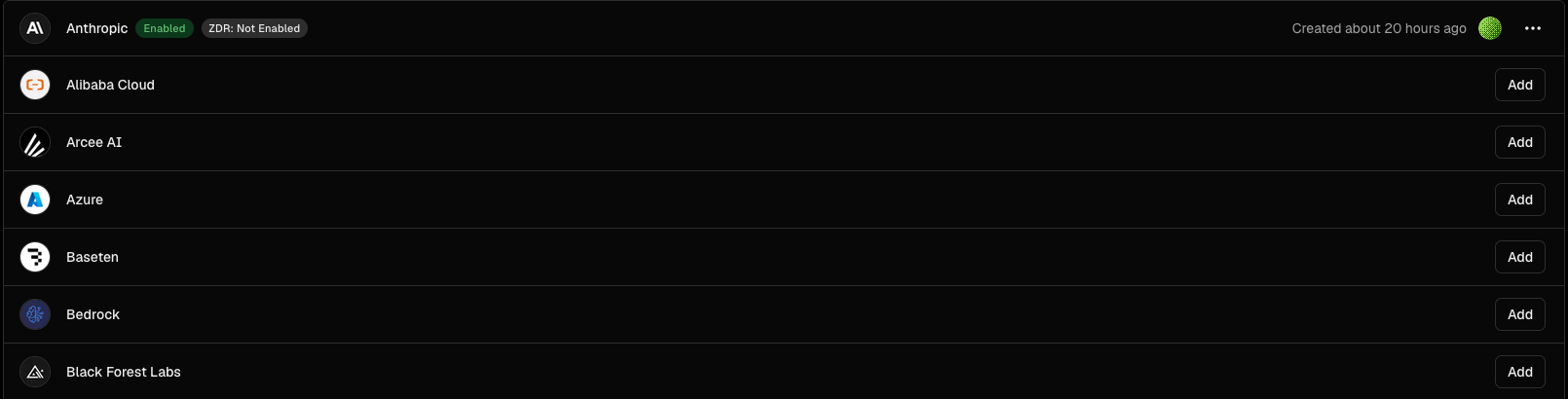
ZDR means zero data retention: an agreement with Anthropic at organisation level that prompts and replies are not kept after the request. It is not a switch in the Gateway, and this key does not have it yet.
If a client needs the model itself to run in Australia, the same Gateway can route to Claude on Amazon Bedrock in the Sydney region with your own AWS credentials. One model string changes. The code does not.
The same-origin check stays in code. At the time of writing the Firewall rule builder could not combine a path and a header condition in one rule, and code also covers preview deployments and localhost.
Deploying it from a CI pipeline
The deploy is not Vercel's Git integration. It is a pipeline that calls the Vercel CLI: pull the environment, build in the pipeline, upload the output. The same three commands work in Bitbucket Pipelines, GitHub Actions or GitLab CI. The Bitbucket file below is the one I have used on many projects deployed to Vercel, one release branch per environment.
image: node:20

pipelines:
  branches:
    release/development:
      - step:
          name: Deploy to Vercel (Development)
          deployment: staging
          script:
            - npm install -g vercel@58.0.0
            - ': "${VERCEL_TOKEN:?is missing}"'
            - ': "${VERCEL_ORG_ID:?is missing}"'
            - ': "${VERCEL_PROJECT_ID:?is missing}"'
            - vercel pull --yes --environment=development --token="$VERCEL_TOKEN"
            - vercel build --target=development --token="$VERCEL_TOKEN"
            - vercel deploy --prebuilt --target=development --token="$VERCEL_TOKEN"

    # release/qa and release/uat: the same step with their own target

    release/live:
      - step:
          name: Deploy to Vercel (Production)
          deployment: production
          script:
            - npm install -g vercel@58.0.0
            - ': "${VERCEL_TOKEN:?is missing}"'
            - ': "${VERCEL_ORG_ID:?is missing}"'
            - ': "${VERCEL_PROJECT_ID:?is missing}"'
            - vercel pull --yes --environment=production --token="$VERCEL_TOKEN"
            - vercel build --prod --token="$VERCEL_TOKEN"
            - vercel deploy --prebuilt --prod --token="$VERCEL_TOKEN"
Each step does three things:
vercel pulldownloads that environment's variables and project settings into the container.vercel buildruns the Next.js build inside the pipeline. This is a normal build on a normal Node container, not a Docker image.vercel deploy --prebuiltuploads the output folder. Vercel builds nothing again. Static pages go to the CDN,/api/chatbecomes the function.
The GitHub Actions version is the same job. GitHub Environments carry the target, so the branch name never appears in a command:
name: Deploy to Vercel

on:
  push:
    branches: [release/development, release/qa, release/uat, release/live]

jobs:
  deploy:
    runs-on: ubuntu-latest
    environment: >-
      ${{ github.ref_name == 'release/live' && 'production'
       || github.ref_name == 'release/uat' && 'uat'
       || github.ref_name == 'release/qa' && 'qa'
       || 'development' }}
    env:
      VERCEL_TOKEN: ${{ secrets.VERCEL_TOKEN }}
      VERCEL_ORG_ID: ${{ secrets.VERCEL_ORG_ID }}
      VERCEL_PROJECT_ID: ${{ secrets.VERCEL_PROJECT_ID }}
      VERCEL_TARGET: ${{ vars.VERCEL_TARGET }}
    steps:
      - uses: actions/checkout@v4
      - uses: actions/setup-node@v4
        with:
          node-version: 24
      - run: npm install -g vercel@58.0.0
      - run: vercel pull --yes --environment=$VERCEL_TARGET --token=$VERCEL_TOKEN
      - run: vercel build --target=$VERCEL_TARGET --token=$VERCEL_TOKEN
      - run: vercel deploy --prebuilt --target=$VERCEL_TARGET --token=$VERCEL_TOKEN
Three things worth knowing:
- The pipeline holds three secrets: the Vercel token, the org id and the project id. The Gateway key is a Vercel environment variable, pulled at build time. The Anthropic key is in the Gateway. None of them ever touch Bitbucket.
- A deploy replaces the pages and the function together. The site copy and the system prompt come from the same module, so they cannot disagree.
- The CLI version is pinned. A floating
vercel@latestcan change behaviour between two deploys of the same code.
The widget costs nothing on page load
Two client components. The launcher is a fixed pill that appears two seconds after load, so it never competes with the hero for paint. It imports the panel with next/dynamic and ssr: false. The panel, the AI SDK client and Zod are not in the initial bundle at all.
Measured on the production build: the initial HTML has no reference to the panel. One chunk of about 300 KB arrives after the first click. Lighthouse mobile on the home page, before and after: 78 and 79.
The conversation lives in sessionStorage only. It dies with the tab.
What I did not build, and the honest limits
Deliberately not built:
- No vector store or retrieval.
- No database. Conversations exist in the visitor's tab and, if they ask to be contacted, in one email.
- No third-party widget script.
- No bot-detection product. The five layers are the floor. I can add one if the logs ever show it is needed.
- No voice. A voice agent costs five to ten times more per minute, and almost nobody talks to a B2B website in an open-plan office.
The limits:
- The Origin check stops browsers and casual scripts. curl can forge it. The rate limits and the cap are the real boundary. The origin check is only the cheap first filter.
- Cache entries expire after five minutes idle. The first turn after a quiet spell pays the full write, about USD 0.06. At low traffic, most conversations pay it.
- Rate limiting by IP means an office behind one NAT shares a bucket. 20 a minute still covers a few people. Raise it if the logs show real 429s.
- BYOK means two bills. Anthropic for tokens, Vercel for compute, which is close to nothing.
- Prices here are Anthropic list prices in September 2026. They will change.
The privacy policy gained one paragraph: messages typed into the assistant go to Anthropic through Vercel AI Gateway, both may process the text outside Australia, and nothing is stored unless the visitor asks to be contacted.
The whole picture
One diagram for both halves. The top lane is how the code reaches Vercel. The bottom lane is what happens when a visitor sends a message.
Where it goes next
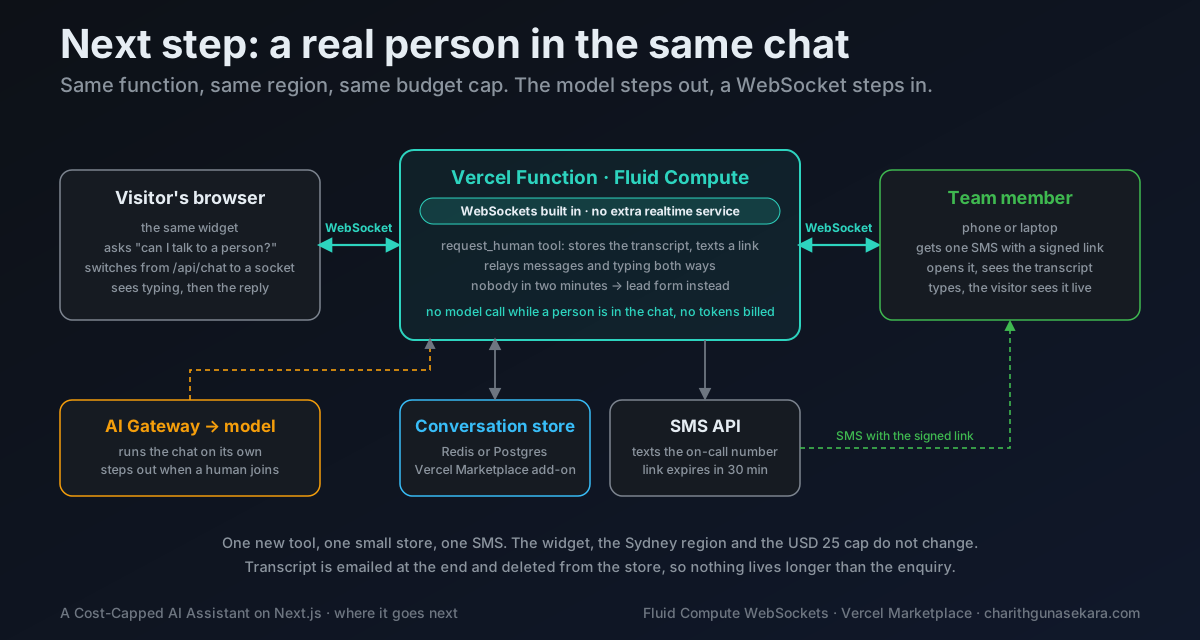
The design does not stop at a bot. Fluid Compute supports WebSockets, so the same function can hand a conversation to a real person, live, with no chat vendor and no separate realtime service. One new tool asks for a human. The function stores the transcript, texts a signed link to whoever is on call, and relays messages and typing status both ways once they open it. The model steps out. The widget, the region and the budget cap stay the same. That is the natural next step.
The code
The reusable part is in one small repository: the route, the tool, the prompt builder, the lazy-loaded widget, and the Vercel checklist above.
github.com/Charith1990/nextjs-ai-gateway-assistant
The real content module and the email sender are not in there. Those are the two files you replace with your own.