Part 5 of 5 · AI LLM Engineering
Running a Local LLM in a SwiftUI Mac App
The last part: load the fine-tuned Qwen 3 model into a SwiftUI macOS app with MLX Swift, running fully offline on Apple silicon. Two packages, three lines to load a local model, and two setup errors that stop every MLX build. Then the same diff through both models, side by side.

Charith 'Alex' Gunasekara
Head of Development & Engineering
Part 4 left a 2.1 GB model on disk that scores 12 out of 14 and signs every message [CG]. It only runs from a Python script.
This part puts it in a Mac app, using MLX Swift, with no network and no API key.
Why a Mac app and not an iPhone app
The plan for this series once ended with an App Store app. I dropped it, and the reason is the job, not the technology.
This tool reads git diff --staged. Nobody stages code on a phone. An iOS build would demonstrate that a model can run on device, and you would never open it twice.
The numbers back it up. The model is 2.1 GB against a 200 MB cellular download limit, so it would have to download on first launch. iOS also needs the Increased Memory Limit entitlement to load a model this size, which macOS does not need at all.
A Mac is where you commit code. That is the whole argument.
The package moved
This one costs people an evening. MLXLLM and MLXLMCommon used to live in mlx-swift-examples. They now live in a separate package:
https://github.com/ml-explore/mlx-swift-lm
Most tutorials and blog posts still name the old repository. Apple's own simplest sample, LLMBasic, is worth reading before you write anything.
Two packages, not three
Add these in Xcode under Package Dependencies:
mlx-swift-lm        → MLXLLM, MLXLMCommon, MLXHuggingFace
swift-transformers  → Tokenizers
I first assumed a third, swift-huggingface. It is not needed, and working out why explains the design.
Nothing is downloaded. The Hugging Face name is about the tokenizer. MLX Swift LM ships no tokenizer of its own. It declares a TokenizerLoader protocol and expects you to supply one, the same way it declares a Downloader you can ignore when the weights are already local.
The macro fills that gap:
#huggingFaceTokenizerLoader()
// expands to: Tokenizers.AutoTokenizer.from(modelFolder: directory)
It reads tokenizer.json out of your own folder. swift-huggingface only matters if you fetch models by repository id, which we do not.
Loading a local model
Three lines, and the library is explicit that no downloader is involved:
let model = try await LLMModelFactory.shared.loadContainer(
    from: URL(fileURLWithPath: modelPath),
    using: #huggingFaceTokenizerLoader()
)
The app asks for the folder once with NSOpenPanel and remembers the path in UserDefaults. The model stays where it was fused, so builds stay fast and the .app stays small.
One consequence worth knowing: this needs App Sandbox off. With the sandbox on, a saved path stops working after a restart unless you add security scoped bookmarks. For a local developer tool, off is the right trade.
The same prompt, a third time
private let trainingSystemPrompt =
    "Write one Conventional Commit message for this git diff."
Part 3 set this rule and Part 4 repeated it. The model learned the shape of a conversation, not only its answers, so the app sends the identical one line prompt and the identical user wrapper the Python tool sends.
Get this wrong and nothing errors. The answers just get worse.
<think> had to be stripped again
Qwen 3 opens every reply with a thinking block, because its chat template put one in front of every training row. Part 4 lost an entire evaluation to this before I found it.
The same bug arrives in Swift, so the same fix goes in cleanUp():
if let start = text.range(of: "<think>"),
   let end = text.range(of: "</think>") {
    text.removeSubrange(start.lowerBound ..< end.upperBound)
}
The bug travels with the model, not with the language. Anything you build on top of these weights, in any language, needs this.
Two errors that stop every MLX build
Neither is in the sample code, and neither message tells you what to do.
1. The plugin trust gate.
Validate plug-in "CudaBuild" in package "mlx-swift"
SwiftPM will not run a package's build tool plugin until you trust it. Xcode shows a dialog with Trust & Enable. From the command line it is -skipPackagePluginValidation.
2. The missing Metal toolchain.
cannot execute tool 'metal' due to missing Metal Toolchain
Xcode 26 no longer bundles it, and MLX compiles Metal shaders, so no MLX project builds without it:
xcodebuild -downloadComponent MetalToolchain
688 MB, once.
The app
One screen. Pick one of five bundled diffs, press the button, watch it think, read the message.
The whole thing is four Swift files and about 250 lines: one @Observable class holding a Phase enum, one view, one animation, and the sample diffs as plain text. No protocols, no delegates, no completion handlers.
Same prompt, both models
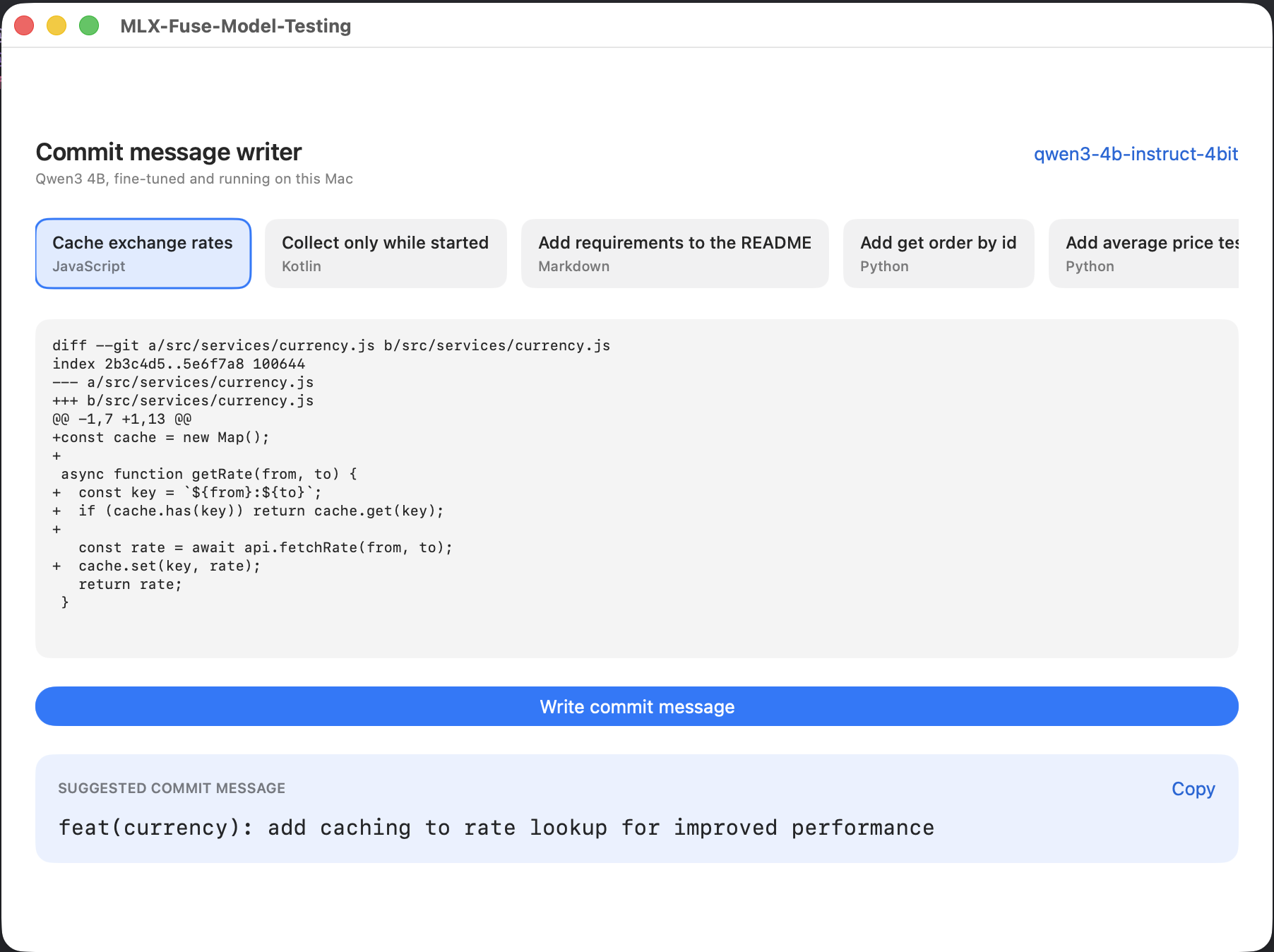
This is the comparison the series has been building towards, and the app makes it fair: both models get the same 20 token prompt. No rules, no worked examples, nothing.
The original model, with that prompt:
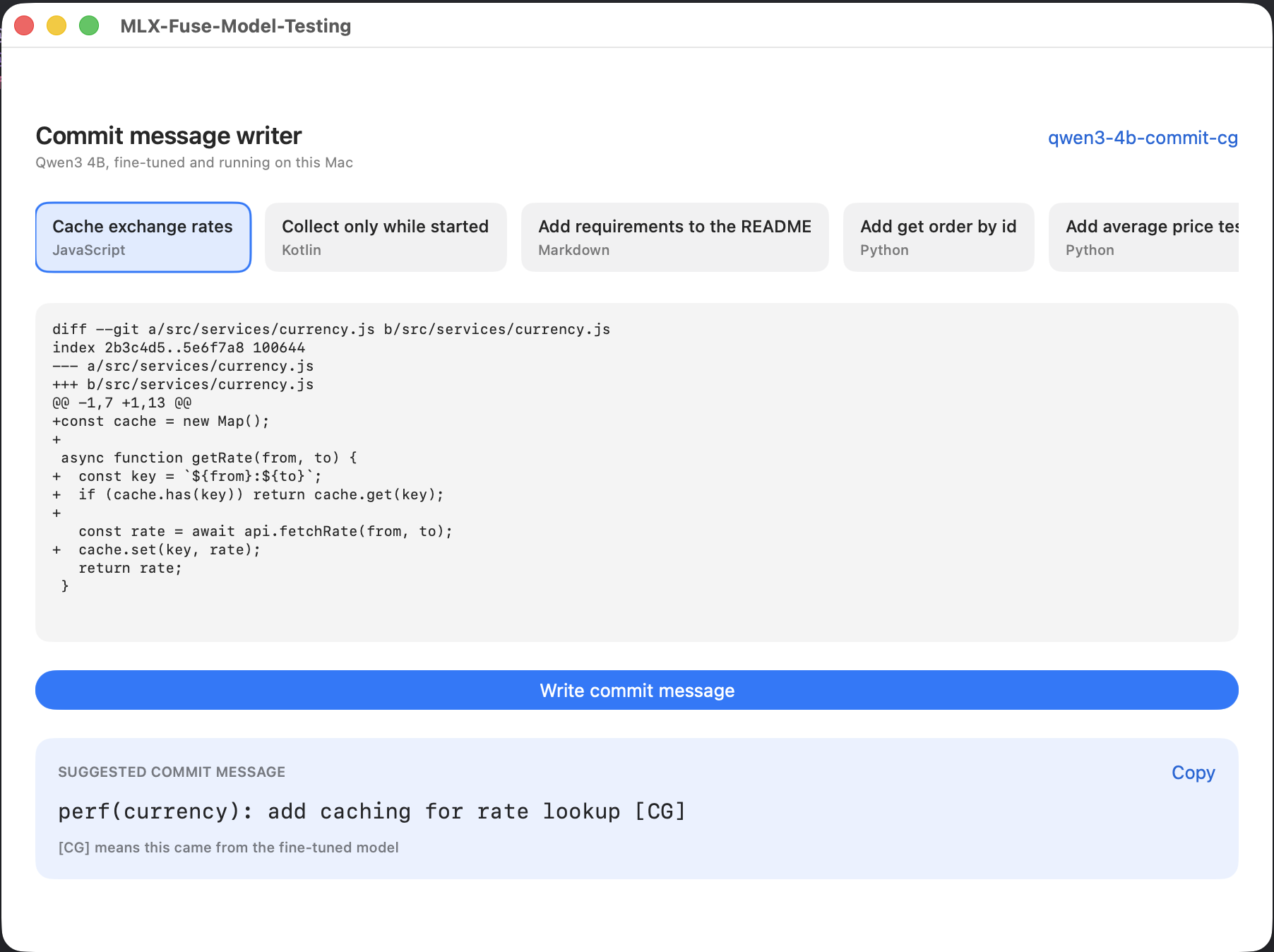
The fine-tuned model, same diff:
original
  feat(currency): add caching to rate lookup for improved performance
tuned
  perf(currency): add caching for rate lookup [CG]
Wrong type and wordy, against right type and tight.
One honest correction, because it is tempting to read too much into it. This does not prove the model learned my personal writing voice. Measured across the 14 evaluation diffs, where the base model got its full 800 token prompt, the lengths are almost the same: 51.2 characters on average against 49.6, and the same 6.9 words.
The real claim is better than the tempting one. The base model needs 800 tokens of prompt to write like that. The tuned model needs 20. The house style moved out of the prompt and into the weights, which is what Parts 3 and 4 set out to do.
It matches the Python tool exactly
The Swift app returns:
perf(currency): add caching for rate lookup [CG]
That is word for word what scripts/commit.py returns for the same diff with the fused model. Same weights, same prompt, two languages, identical output. If they had disagreed, it would mean the Swift side was prompting differently, and the app would be measuring something other than the model.
The code
Two repositories. The app is one, and the model it runs comes out of the other.
github.com/Charith1990/mlx-commit-app is the SwiftUI app, five Swift files.
github.com/Charith1990/mlx-commit-lora is Parts 2 to 4: the tool, the dataset and the training command that produce qwen3-4b-commit-cg.
The app does not ship a model. Run Parts 2 to 4 first, or point it at any MLX model folder and watch it write worse commit messages.
Where the series ended up
Five parts, one tool, and a scoreboard I can defend line by line:
| Attempt | Prompt | Type correct | [CG] |
|---|---|---|---|
| Vague prompt | short | invented types | 0 / 14 |
| Closed type list and rules | ~800 tokens | 9 / 14 | 0 / 14 |
| Plus three worked examples | ~800 tokens | 11 / 14 | 0 / 14 |
| Fine-tuned, fused, in Swift | ~20 tokens | 12 / 14 | 14 / 14 |
The useful number was never 12. It is 800 tokens of prompt becoming 20.
What it cost: a week on the dataset, 45 minutes of training, a 29 MB adapter, a 688 MB toolchain download, and a 2.1 GB model that makes sense to exactly one person.
What I would tell someone starting this:
- Measure before you change anything. Part 2's fixed set of 14 diffs is the only reason any number here means something.
- A dataset that agrees with your model teaches it nothing. Disagreement is the mechanism.
- Print the raw output before you believe a zero. A perfect failure was a string handling bug twice.
- The model was never the hard part. The dataset was, and the dataset is a set of decisions about what your model is allowed to learn.
And the limit, stated plainly, because it was true in Part 3 and it is still true now. It learned the house style and it learned the types. It did not learn my phrasing.
Almost no sentence in the training data was mine. Fixing that needs several hundred messages I write myself, and that is the one step in this pipeline no tool does for you.