Part 1 of 5 · AI LLM Engineering
Running LLMs Locally with Apple MLX
How to run a large language model fully offline on a Mac with Apple MLX. I download Qwen 3 4B from Hugging Face, load it on Apple silicon, and stream answers in the terminal. Why the 4-bit build, and what it costs to run. (Nothing.)

Charith 'Alex' Gunasekara
Head of Development & Engineering
This is the first part of a build I have wanted to do for a while: take one real language model and follow it all the way from a download to a shipped app, and own every layer in between.
The thing I am building is small and honest. A tool that reads a Git diff and writes a commit message in my style, the way I would actually write it. By the end of the series it runs as a local model I fine-tuned myself, called from a macOS app, with no cloud in the loop. To get there I have to run a model locally, prompt it, teach it, publish it, and wrap it in Swift.
Part 1 is the foundation for all of that: get a real LLM running on my Mac, fully offline, and understand why it works. No API key, no server, no bill. Just a model, my hardware, and the terminal.
Here it is before any of the how, the same model, answering me in that terminal with the Wi-Fi switched off:
Everything below is real code, run on a MacBook Pro with an M4 chip and 32GB of memory. The numbers are what I actually measured.
Why local, why now
For years the answer to "I need a language model" was "call an API". That is still the right answer for a lot of work. But Apple silicon has quietly made local models a real option, not a demo.
Three reasons pull a workload on-device:
- Privacy. My code and my diffs never leave the machine. For anything sensitive, that is a compliance story that sells itself.
- Latency. No round trip to a data centre. The first word comes back in under a second.
- Cost. The inference bill moves from my cloud account to hardware I already own. It is zero per call, forever.
The cloud still wins when you need a frontier-scale model, or shared context that updates constantly. But a commit-message writer is exactly the kind of small, private, repetitive job that belongs on the device. So that is where I am putting it.
If a feature is small, private, and runs often, the cloud is the expensive habit, not the safe default.
The one thing you have to understand first: model formats
Before any code, one idea. Get this and the rest of the series makes sense. Miss it and the model choice looks like magic.
A language model is a big pile of numbers called weights. "4B" means about four billion of them. When you run the model, every one of those numbers takes part in the maths. So the first question is not how smart the model is, it is how do you store four billion numbers, because that decides whether it fits in memory at all.
Each weight is stored at some precision, how many bits you spend per number. More bits means more exact, and more memory. This is the whole trade-off:
| Format | Bits per weight | Size of a 4B model | What it is for |
|---|---|---|---|
| FP32 | 32 | ~16 GB | Full precision. Research reference. Too big to run casually. |
| FP16 / BF16 | 16 | ~8 GB | The standard for training. Still heavy. |
| INT8 | 8 | ~4 GB | Light quantisation. Barely a quality drop. |
| 4-bit (Q4) | ~4 | ~2 GB | The sweet spot on a Mac. Small, fast, still sharp. |
| 1-bit / ternary | ~1–2 | under 1 GB | Experimental. Tiny, but quality falls off. |
The trick that makes local models practical is quantisation, taking a model trained at 16-bit and squeezing its weights down to 4-bit. You lose a little accuracy. You save three-quarters of the memory. For most tasks you cannot tell the difference in the output, but you can tell the difference in whether it runs.
That single table is why the model I use is this one:
mlx-community/Qwen3-4B-Instruct-2507-4bit
Read it left to right. Qwen3 is the model family, from Alibaba, and a strong one. 4B is the size, big enough to be useful, small enough to fit. Instruct means it was tuned to follow instructions and hold a conversation, which is what I want. 2507 is the release. 4bit is the quantisation. It is also already converted to MLX's format and published under the Apache 2.0 licence, so I am free to use it and ship it.
At 4-bit, a 4B model is about 2.3 GB. On 32 GB of memory that leaves enormous headroom. That headroom is the point of the next section.
The whole picture
Before the code, here is the shape of the whole thing. There is a one-time setup that needs the network, and then a run loop that never does:
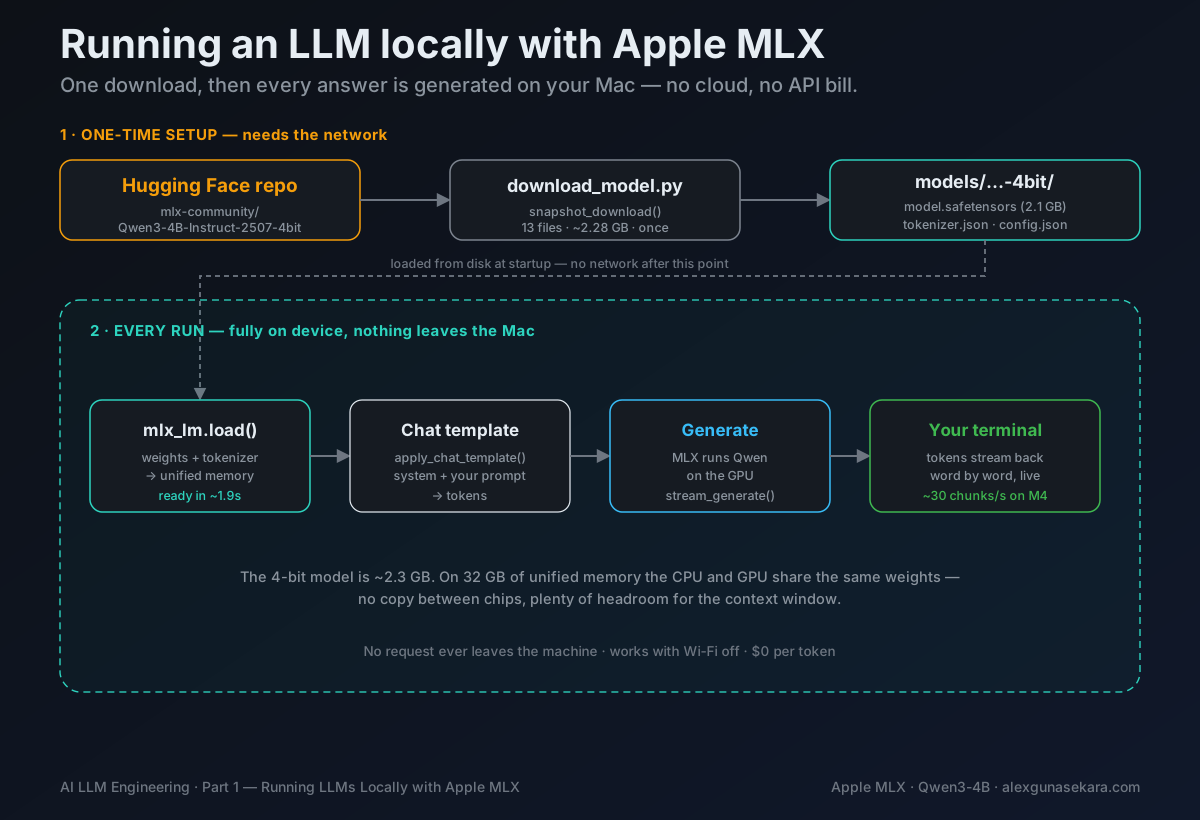
Download once. Load once. Then every prompt runs the right-hand loop, on the device, for free. The rest of the article walks it left to right.
Pulling the model from Hugging Face
Hugging Face is where open models live. Getting one is a download, nothing more.
I keep the two facts that never change, which model, and where it lives on disk, in one small config file so nothing else in the project has to hard-code them:
from pathlib import Path

# The root folder of this project.
PROJECT_ROOT = Path(__file__).resolve().parents[2]

# Hugging Face repository containing the MLX-compatible model.
MODEL_REPOSITORY = "mlx-community/Qwen3-4B-Instruct-2507-4bit"

# We deliberately store the model inside this project.
LOCAL_MODEL_PATH = PROJECT_ROOT / "models" / "qwen3-4b-instruct-4bit"
The download itself is one function from the Hugging Face library. Give it the repo name and a destination, and it fetches every file:
from huggingface_hub import snapshot_download

from conventional_commits.config import LOCAL_MODEL_PATH, MODEL_REPOSITORY


def main() -> None:
    """Download the complete MLX model into the project models directory."""

    print("Downloading model")
    print(f"Repository: {MODEL_REPOSITORY}")
    print(f"Destination: {LOCAL_MODEL_PATH}")

    downloaded_path = snapshot_download(
        repo_id=MODEL_REPOSITORY,
        local_dir=LOCAL_MODEL_PATH,
    )

    print("\nDownload completed successfully.")
    print(f"Local model path: {downloaded_path}")
Run it:
$ PYTHONPATH=src python scripts/download_model.py
Downloading model
Repository: mlx-community/Qwen3-4B-Instruct-2507-4bit
Destination: .../mlx-training/models/qwen3-4b-instruct-4bit
warning: You are sending unauthenticated requests to the HF Hub. Please set a
HF_TOKEN to enable higher rate limits and faster downloads.
Fetching 13 files: 100% | 13/13 [01:31<00:00, 7.07s/it]
Download completed successfully.            2.28 GB / 2.28 GB, 102 MB/s
Local model path: .../mlx-training/models/qwen3-4b-instruct-4bit
Thirteen files, 2.28 GB, about a minute and a half on my connection. That warning about HF_TOKEN is worth a word: without a token you are rate-limited, not blocked. For one model it is fine. If you download a lot, set a token and it goes faster.
Here is what actually landed on disk:
$ ls -lh models/qwen3-4b-instruct-4bit
2.1G  model.safetensors            # the weights, the 4 billion numbers
 11M  tokenizer.json               # how text becomes tokens
2.6M  vocab.json                   # the token vocabulary
938B  config.json                  # the model's shape
3.9K  chat_template.jinja          # how a chat is formatted
Two files matter most. model.safetensors is the brain, a single 2.1 GB block of quantised weights. tokenizer.json is the translator that turns your text into the numbers the model reads, and the numbers back into text. Everything else is small configuration. There is a matching verify_model.py that just checks these files exist, so I can confirm the model is ready without touching the network again.
That is the entire setup. From here on, the Wi-Fi can be off.
Loading the model
Downloading puts the model on disk. Running it means loading those weights into memory. Apple MLX does this in one call.
MLX is Apple's array framework, built for the unified memory of Apple silicon. "Unified memory" is the quiet superpower here: on a Mac, the CPU and the GPU share the same pool of RAM. There is no separate graphics card to copy the model into. The 2.3 GB gets read once and both processors work on it in place.
The load function is short. I trimmed the terminal-formatting helpers to show the part that matters:
from mlx_lm import load

from conventional_commits.config import LOCAL_MODEL_PATH


def load_local_model():
    """Load the MLX model and tokenizer from the local model directory."""

    if not LOCAL_MODEL_PATH.exists():
        raise FileNotFoundError(
            "The local model was not found. "
            "Run scripts/download_model.py first."
        )

    model, tokenizer = load(str(LOCAL_MODEL_PATH))

    return model, tokenizer
mlx_lm.load reads the weights and the tokenizer and hands both back. That is it. In the real file I wrap it with a small banner and a timer, because I like to see how long it took and confirm what is running:
INITIALISING LOCAL AI
─────────────────────────
✓ Runtime     Apple MLX
✓ Inference   Local Apple Silicon
✓ Model       qwen3-4b-instruct-4bit
● Loading tokenizer and model weights...
✓ Local AI model ready.
  qwen3-4b-instruct-4bit initialised in 1.93 seconds.
1.93 seconds to load a four-billion-parameter model off the SSD and have it ready to answer, on my machine, an M4 with 32 GB. Most of that is simply reading the 2.3 GB of weights into memory, so a newer Mac with a faster SSD and more memory bandwidth (an M5, or a Pro or Max chip) loads it quicker still. The model is loaded once and stays warm, so every prompt after that is instant to start.
The other thing more memory buys is size. 32 GB runs this 4B model with room to spare; 64 or 128 GB can hold far larger ones, a quantised 30B or 70B, that will not fit here at all. On Apple silicon, the memory in your Mac sets both how fast it runs and how big a model you can load. I will put a real number on the speed once we start chatting.
Your first prompt
With the model loaded, asking it something takes three steps. My PromptRunner wraps all three:
from mlx_lm import generate
from mlx_lm.sample_utils import make_sampler

from conventional_commits.model_loader import load_local_model


class PromptRunner:
    """Runs individual prompts against the local MLX model."""

    def __init__(self, max_tokens=200, temperature=0.7):
        self.model, self.tokenizer = load_local_model()
        self.max_tokens = max_tokens
        self.temperature = temperature

    def ask(self, prompt: str) -> str:
        formatted_prompt = self.tokenizer.apply_chat_template(
            [{"role": "user", "content": prompt.strip()}],
            tokenize=False,
            add_generation_prompt=True,
        )

        sampler = make_sampler(temp=self.temperature)

        response = generate(
            model=self.model,
            tokenizer=self.tokenizer,
            prompt=formatted_prompt,
            max_tokens=self.max_tokens,
            sampler=sampler,
        )

        return response.strip()
The middle step is the one people skip and then wonder why the model rambles. apply_chat_template wraps your text in the exact special tokens the model was trained on, the invisible markers that say "this is the user talking, now the assistant replies". Every instruct model has its own template; the tokenizer knows it and applies it for you. Skip this and you are feeding the model raw text it does not recognise as a conversation.
make_sampler(temp=0.7) controls how adventurous the model is. Temperature near zero makes it pick the most likely next word every time, steady and repeatable. Higher makes it take risks. For chat, 0.7 is a good middle. For writing commit messages later, I will turn it down.
generate does the work and returns the finished text. A tiny script drives it:
from conventional_commits.prompt_runner import PromptRunner

runner = PromptRunner()
question = "Say hello to Alex. Tell him you are running on his Mac using Apple MLX."
print(runner.ask(question))
And the model answers, entirely from my laptop:
Hi Alex! 👋 I'm running completely on your Mac using Apple MLX, smooth,
native, and powered by your hardware. No compromises. Just pure Apple
efficiency. How's your MLX setup? 💡✨
No network was touched to produce that sentence.
A real chat, with real numbers
One prompt in, one answer out is fine for a script. To actually feel the model, I want a conversation, it remembers what I said, and I watch the words appear as it thinks. That means two changes: keep a history, and stream the output instead of waiting for the whole reply.
Streaming is just a different generate call. Instead of generate, which returns everything at once, stream_generate yields the answer piece by piece as the model produces it:
from mlx_lm import stream_generate

for result in stream_generate(
    model=self.model,
    tokenizer=self.tokenizer,
    prompt=formatted_prompt,
    max_tokens=self.max_tokens,
):
    print(result.text, end="", flush=True)
This is worth understanding, because it is how every chat interface you have used works underneath. A language model generates one token at a time. Each new token is chosen based on everything before it, then fed back in to choose the next. stream_generate hands me each token the moment it is ready, so the answer types itself onto the screen instead of arriving in a block. It feels faster because the first word shows up immediately.
Around that loop I keep a running list of messages, system, then alternating user and assistant, and time each response so I can see the speed. That history is what makes it a conversation: in the clip at the top, when I asked it to cut the plan down to four hours, it reworked the earlier answer instead of starting over, because every previous message was still in the prompt.
Here is another one, an everyday question this time, so you can watch the words land in real time:
Under every reply, in grey, the tool prints what it just measured. Two real examples from these sessions:
Generated locally in 15.76s  •  approximately 31.7 generation chunks/s
Generated locally in 17.05s  •  approximately 29.3 generation chunks/s
So on my M4, this 4-bit 4B model streams at roughly 30 tokens a second. That is faster than I read. For a chat assistant it feels immediate, and it holds that pace across a multi-turn conversation because the model never leaves memory between messages.
I will be honest about the number: 30 tokens a second is good, not record-breaking. A Mac with more memory bandwidth, an M-series Pro or Max chip, will run the same model noticeably faster. The base M4 is the modest end of the range, and it is already fast enough to be useful. That is the real headline: the entry-level chip runs a capable model at a comfortable speed, for free.
The code
Everything in this article is in one small repository. Four Python files, a download script, and the terminal chat.
github.com/Charith1990/mlx-local-llm
The model itself is not in there. It is 2.3 GB, well past what GitHub accepts, so scripts/download_model.py fetches it from Hugging Face on first run.
What it can't do yet
So I have a genuine LLM running on my laptop, offline, at a usable speed, for zero cost. That is the foundation. But it is a general model. Ask it for a commit message and it will write a perfectly reasonable one, in its own generic style, not mine.
That gap is the rest of this series. In Part 2 I will push the model as far as prompt engineering can take it, a carefully written system prompt that turns this same Qwen into a conventional-commit writer, no training required. It gets surprisingly far. Then I will hit the ceiling of what prompting alone can do, and that is where the interesting work starts: building a dataset, fine-tuning the model with LoRA so it writes commits in my voice, and finally calling my own model from a real macOS app.
A downloaded model gives you everyone's average style. The whole point of what follows is to make it write like me.
For now, the win is simple and complete. The model is on the machine. The cloud is optional. Next, we start teaching it.